
Explore the latest trend of creating ultra-realistic 3D figurines using Google’s AI Studio. Follow our step-by-step guide to make personalized Nano Banana figurines with ease. Learn how to generate 3D models, customize prompts, and showcase your creations for free!
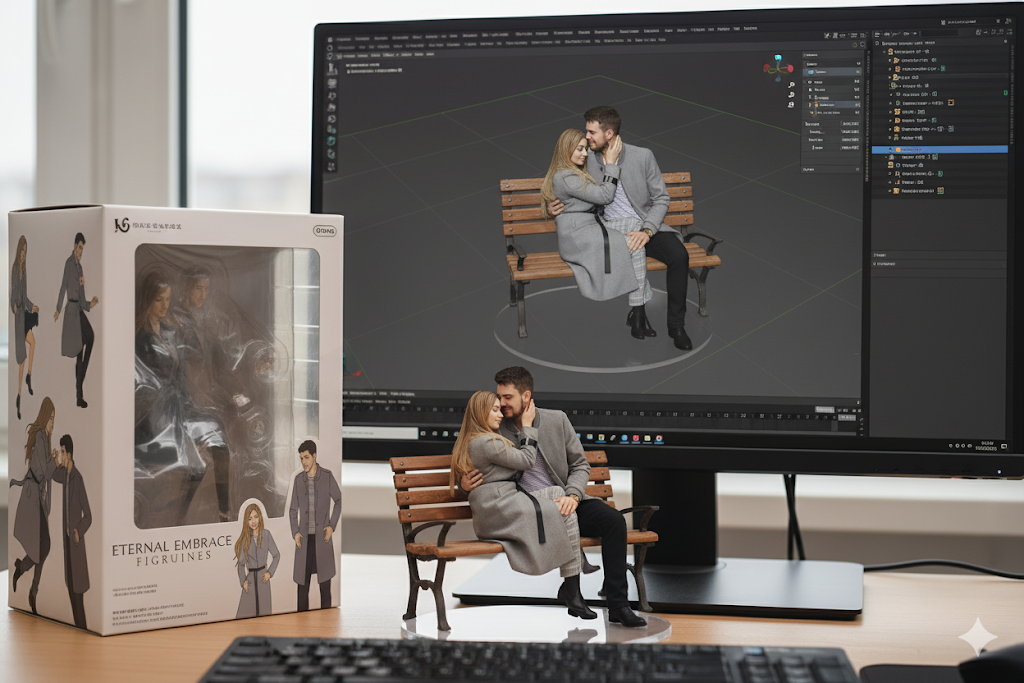
AI is changing creative quickly these days, and a new fad that has grabbed the internet by storm is Nano Banana 3D Figurines. With Google’s AI Studio and the Gemini app, it’s easier than ever to make 3D figures of yourself, your loved ones, or even made-up characters that look very lifelike. This big step forward is making things easier for both casual users and professional makers. Being able to turn pictures into 3D miniatures is a game-changer for anyone who makes content, loves technology, or just likes to have fun.
This blog post will show you how to make Nano Banana 3D miniatures for free, step by step. We’ve got you covered from getting to the tool to changing the question on your figurine.
What is Nano Banana, and why is it so popular?
The Nano Banana movement is all about leveraging Google’s Gemini AI algorithm to turn pictures into 3D miniatures that are worth collecting. Think of how exciting it would be to turn a simple picture into a tiny model that you could actually collect. Anyone can make personalized 3D miniatures in realistic surroundings that look like highly detailed, commercialized figures with just a few clicks.
This new trend has gone widespread, with people on social media rushing to make their own tiny copies, share them, and even make their own unique habitats and settings for their models.
How can you make a Nano Banana 3D figure?
You can easily make a Nano Banana 3D figure for free using Google’s AI Studio or the Gemini app. Here’s a full breakdown:
- Access Google AI Studio or Gemini: You need to first go to Google AI Studio or open the Gemini app on your device. Both systems are made to make it easy for people to make advanced 3D material for personal or business usage.
- Submit a photo or use a text prompt: You may either submit a high-quality photo of the person or figure you want to turn into a 3D figurine or use a text prompt to make one. We suggest uploading a clean, well-lit portrait shot to achieve the best results.
- Make Your 3D Figurine: After you upload the photo or choose a prompt, type in a specific prompt to help the AI make your figurine. You can use this prompt as an example:“Create a 1/7 scale commercialized figurine of the characters in the picture, in a realistic style, in a real environment. The figurine is placed on a computer desk. The figurine has a round transparent acrylic base, with no text on the base. The content on the computer screen is a 3D modeling process of this figurine. Next to the computer screen is a toy packaging box, designed in a style reminiscent of high-quality collectible figures, printed with original artwork. The packaging features two-dimensional flat illustrations.”
- Make Changes and Personalize: You can look at the image once you make your figurine. You can change the prompt or submit a new photo if you need to. The AI usually only takes a few seconds to make the model.
- Save or Share Your Creation: You may store your Nano Banana 3D figure on your device or share it right away on social media after making it. A lot of people share their figurines for fun or as part of their artistic work.
How to Make Great 3D Figurines
Making a Nano Banana 3D figure is simple, but there are several important things to keep in mind to get the best results:
- Use High-Quality Photos: The 3D figurine will look more lifelike and polished if you upload a photo of higher quality. Make sure the subject of the photo is clear and in focus and that the light is bright.
- Experiment with Prompts: Try out numerous prompts to make one-of-a-kind and themed figurines. Customization is the most important thing, whether you desire a fantasy style, a professional environment, or a fun sci-fi touch.
- Fine-Tune the Details: Change the created figure as needed. If you want, you can modify the background, the setting, or even the pose of the figure.
- Share Your Creations: Don’t keep your works to yourself; share them! Put your 3D figurines on social media, make an album of your miniatures, and let other people see your AI-powered art.
Why do so many people use Google’s AI Studio to make 3D figurines?
People like Google’s AI Studio and Gemini app because they are easy to use, feature sophisticated AI, and can make pictures that look very lifelike. The models that come out of the process are really realistic and detailed, which makes it not only enjoyable but also very fulfilling. This has led to a huge amount of content online, as people are often trying out new ideas for their 3D figurines.
Final Thoughts:
The fad of making Nano Banana 3D figures has started a creative revolution and brought AI technology closer to regular people. If you want to design a tiny version of yourself or a one-of-a-kind figure, Google AI Studio makes it easy, entertaining, and free. This is a great chance to make super-realistic 3D models and show them off to the world!
Make your Nano Banana 3D sculpture today and join the viral craze that is hitting the internet by storm!
Also read: Refuse to Register Your FIR? Step-by-Step Guide for Justice